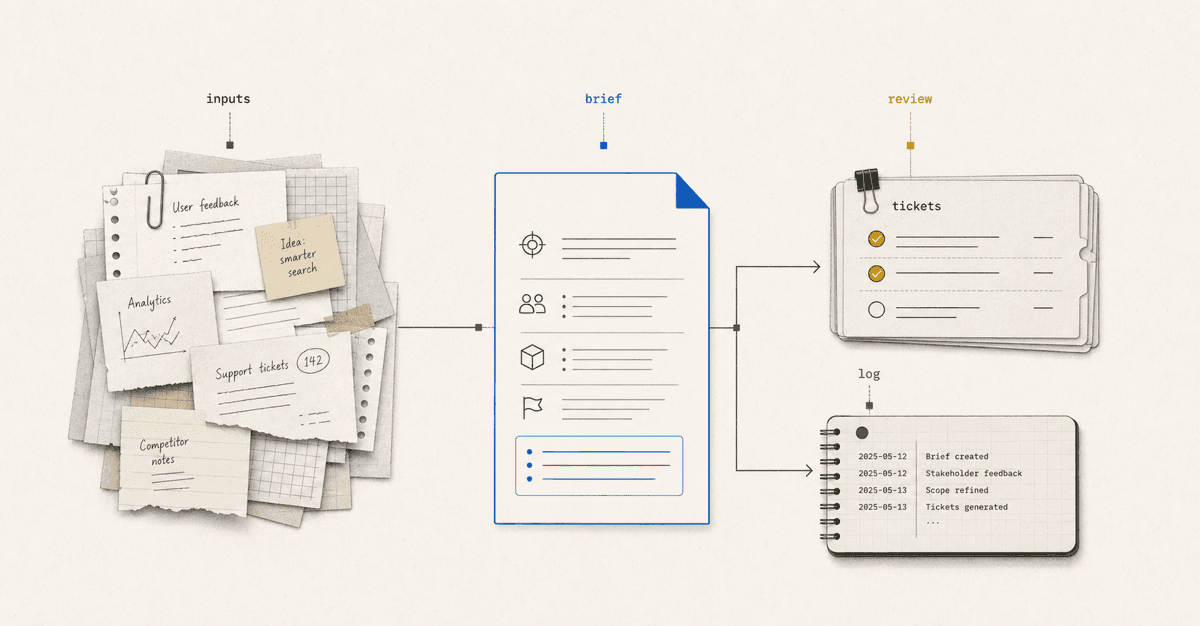
The obvious risk with AI-assisted work is that you stop thinking. You rely on AI too much and your critical thinking edge degrades slowly. I've spent six months building skills, knowledge files, and context files to prevent this. Not to outsource the work, but to produce higher quality work, on repeat, and faster. Also, to learn new mental models, approaches and broaden my thinking. These are the six patterns I've learned work well.
1. Automate the groundwork
AI is useful for the parts of product work that are scattered, tedious, and easy to underdo.
I use it to:
- Research across notes, docs, tickets, chat, email, and prior projects.
- Gather source material into one place.
- Catalog what exists, what is missing, and what failed to load.
- Summarize evidence without pretending weak evidence is strong.
- Surface related work, duplicated effort, dependencies, and stale assumptions.
The agent is not making the product decision here. It is doing the groundwork I would otherwise rush or skip.
When I kick off a new project, Claude dispatches a sub-agent researcher for each system: Slack, Google Drive, Jira, Airtable, email, and the local workspace. They run in parallel. The results land in a single research file. By the time I open the project, the context is already gathered.
When I come back to a project after a few days or weeks, this gives both the agent and me a way to pick up where we left off.
2. Structure the work
Once the raw material exists, AI can turn scattered context into working artifacts. These artifacts solve the cold-start problem. Each one is a warm handover: structured, researched, and ready to think about rather than fill in from scratch.
For a product brief, that means four things:
- A skeletal draft with every assumption flagged and every unknown marked.
- A research synthesis from the parallel sweeps.
- A risk register, short and capped.
- An open questions list, ranked: Critical, Important, Nice-to-have.
The pattern is not to ask AI to one-shot the final draft. It is to ask for a structured draft that makes uncertainty visible.
3. Partner on judgment
After the material is structured, I shift from using AI to gather and format to using it as a thinking partner.
I ask it to:
- Challenge assumptions.
- Ask sharper questions.
- Suggest simpler scopes.
- Pressure-test the narrative.
- Compare options.
- Role-play reviewers or stakeholders.
- Help me get to a clearer decision.
This is where Claude acts less like a task runner and more like a thinking partner. It can hold the map, notice weak spots, and keep asking the questions a rushed team skips.
Here is an excerpt from my one-pager skill:
4. Run a review panel early
A reviewer panel turns late-stage feedback into an earlier drafting habit.
Useful default lenses:
- Product leader: Why does this matter, and why now?
- Engineering lead: What breaks, blocks, or costs more than expected?
- Designer or UX lead: Does the experience make sense?
- Analytics partner: Will we know whether this worked?
- Support, legal, security, or content reviewer: Add only when the work touches their domain.
The point is not to simulate a perfect meeting, or to skip talking to the actual stakeholder. It is to find the objections while the artifact is still cheap to change, so I can walk into the real conversation with sharper questions.
5. Connect and sync
I am less frustrated by double entry because I can usually teach Claude how to move the work for me.
I use skills and connectors to:
- Push structured markdown into systems like Airtable, Jira, Google Docs, or another system of record.
- Pull updates back into the local folder.
- Compare local files against the last synced version.
- Bake business rules, field mappings, and workflow logic into the process.
- Keep formats, fields, and structure consistent across systems.
A Jira skill can use an MCP or API connection to reach Jira, but the skill is what knows which fields are required, how priorities map, which statuses are safe to update, and how markdown should become Jira wiki markup. An Airtable skill can know which base, table, fields, and linked records matter.
This is where the local folder approach starts to make sense. The files are readable by me, reusable by AI, and portable into the tools my team already uses.
6. Preserve the learning
The final pattern is memory. AI does not reliably retain the context I need between sessions. Without a system to preserve it, every new conversation starts from scratch.
I use AI-assisted workflows to:
- Create read-first files.
- Keep source material near outputs.
- Log decisions and next steps.
- Record what was skipped or blocked.
- Turn repeated work into reusable skills, prompts, and templates.
The key to making this stick is a custom activity log, a markdown file that lives in each project folder. Unlike Claude's built-in memory, it persists across sessions, works across multiple agents, and captures exactly what I decide to record: decisions made, steps skipped, and what comes next. The next session picks up where the last one ended.
The six principles
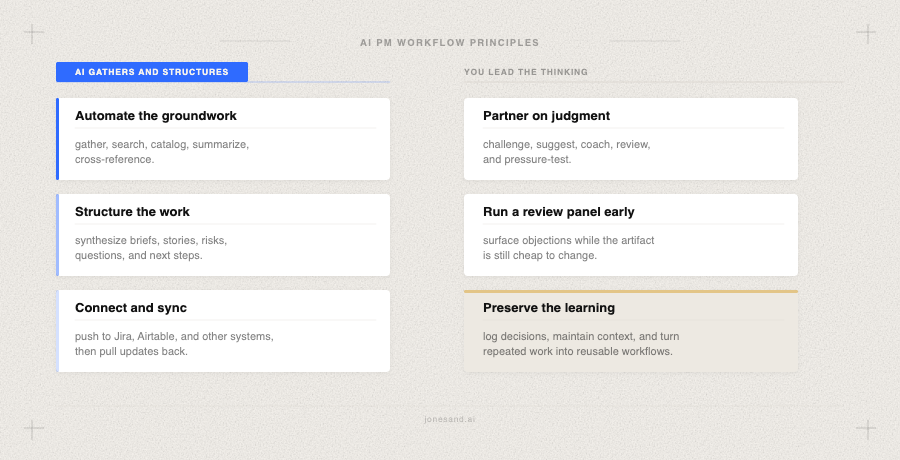
I am not really trying to build a perfect loop. I am trying to build reusable skills, automations, and primitives that make my work better and faster.
This is the pattern that keeps showing up: more context at the start, better questions in the middle, and less rediscovery the next time around.
It still breaks in plenty of places. But it breaks in more useful places than a blank page does.